Well, I've just committed a batch of updates to txtckr, which has finally moved beyond a mix of php & pseudo-php to a stage where I run it on a laptop without any errors (with the included very simple test).
It's almost at the stage of adding the finishing touches to the name handling, where the various openurl name parts get humpty-dumptied again. It's just skeleton coding at this stage, but hopefully a pretty sound basis for what's to come!
Sunday, September 27, 2009


Thursday, September 17, 2009
Google Co-op: EBSCO Connect search
There's been a bit of talk about EBSCO Connect content appearing on Google, and while it's not the sort of thing that thrills me necessarily, I found it was easy enough to create yet another Google Custom search, which would allow the retrieval of EBSCO connect material only.
There appears to be quite a bit of content there - give the search a go, and leave a response if you feel that way inclined...
There appears to be quite a bit of content there - give the search a go, and leave a response if you feel that way inclined...
Thursday, August 6, 2009
Dealing with humans' (names)
Recently I hit a slight snag on a fairly common problem... dealing with names. This is a problematic area, given that everyone has one, and trying to build in what we know about names into software is actually a bit of a slog!
What I'm doing is trying to parse names, (mainly author names), for txtckr, so that one of the output display formats could be a reference, (APA, for example). To do this, I also need to untangle the "rft.au" information which is delivered through OpenURL, and I'm trying to build in some "forgiveness" to allow for people/companies that don't follow spec's properly!
Things to consider:
What I'm doing is trying to parse names, (mainly author names), for txtckr, so that one of the output display formats could be a reference, (APA, for example). To do this, I also need to untangle the "rft.au" information which is delivered through OpenURL, and I'm trying to build in some "forgiveness" to allow for people/companies that don't follow spec's properly!
Things to consider:
- with a full name, is it supplied first-name(s) last-name/surname, and if so, where does the surname begin? This is fine for a fair number of relatively simple names, but what about surnames which aren't, such as "van der Weerden"?
- if you're going to receive name fragments, how do you build these sensibly into software, so you can give permutations of the name, e.g. Pasley, Tom == Pasley, T. == Tom Pasley == T. Pasley?
Friday, July 17, 2009
What if OpenURL resolvers could blog?
I thought about this when I was thinking about having support for unAPI, etc. I found Mike Giarlo's plugin for WordPress, which added this, and I could make it work for txtckr, but why should I?
I may have overlooked something, (since I don't use WordPress), but:
There's also the tools available through something like the WordPress platform, which further promotes the re-distribution of information about articles, books, etc., including COinS, RSS feeds, OAI-PMH, unAPI, etc.
Of course there's also the ability for others to comment and refer, (trackback), on the item being represented in the blog post.
I may have overlooked something, (since I don't use WordPress), but:
- what if WordPress was the OpenURL resolver, (well, actually it wasn't but just looked like it)?
- what if txtckr could redirect to the WordPress post which had the request response once it had made a post which contained all of that info?
There's also the tools available through something like the WordPress platform, which further promotes the re-distribution of information about articles, books, etc., including COinS, RSS feeds, OAI-PMH, unAPI, etc.
Of course there's also the ability for others to comment and refer, (trackback), on the item being represented in the blog post.
Wednesday, July 15, 2009
txtckr under development
While I was working at Crop & Food Research, I developed an OpenURL resolver called textseeka.
txtckr is a GPL, (open-source), OOP focussed, replacement for textseeka, based on what I know now, in terms of programming, OpenURL, webservices and metadata sources.
This is not a simple overnight project, complicated by the fact that I need access to the original code-base, which is still at my old work. Over time, (snatched here and there), txtckr will be fleshed out, starting from the bones that are there now, (currently just a class for the "context object").
txtckr is a GPL, (open-source), OOP focussed, replacement for textseeka, based on what I know now, in terms of programming, OpenURL, webservices and metadata sources.
This is not a simple overnight project, complicated by the fact that I need access to the original code-base, which is still at my old work. Over time, (snatched here and there), txtckr will be fleshed out, starting from the bones that are there now, (currently just a class for the "context object").
Saturday, July 4, 2009
If you can't bet them, join 'em...
I've been at UCOL Library for a while now, which means I'm firmly part of the Ex Libris picture, as we have Voyager, which is quite a part of my job, as the Information systems Librarian.
As such, I've spent quite a bit of time putting lipstick on the pig... and one of the features I've implemented recently is an APA citation for each of the books in our catalogue, which is bottom-rightish. This picture might be a little fuzzy, (but you can't see it unless you're on-campus anyway...):

Initially, I thought this would be quite easy, since I thought we must have at least some OCLC-derived records in our catalogue. The APA citation service requires an OCLC number, and I learnt that there are not that many records which have OCLC numbers... but there are, of course, lots which have ISBNs.
The solution required writing some web scripts which:
Isn't this what LibX does? Maybe this is part of what is currently possible with their LibApps?
As such, I've spent quite a bit of time putting lipstick on the pig... and one of the features I've implemented recently is an APA citation for each of the books in our catalogue, which is bottom-rightish. This picture might be a little fuzzy, (but you can't see it unless you're on-campus anyway...):

Initially, I thought this would be quite easy, since I thought we must have at least some OCLC-derived records in our catalogue. The APA citation service requires an OCLC number, and I learnt that there are not that many records which have OCLC numbers... but there are, of course, lots which have ISBNs.
The solution required writing some web scripts which:
- do a lookup on the ISBN, and get the OCLC number
- use the OCLC number to get the APA citation
- generate JSON output so this is accessible to the browser
Isn't this what LibX does? Maybe this is part of what is currently possible with their LibApps?
Saturday, June 13, 2009
NTS:: When Sansa's go bad...
[Legal Warning: By following these instructions, you agree not to hold me liable for any bad sh*t that happens to your MP3 player.]

In case this happens again, here's how to un-brick a Sansa Express... in Windows XP, with access to the Administrative Tools (I'm not sure how to do the same in Linux - any ideas?).
I'm unsure how my son's Sansa Express was bricked, but a common cause fro "bricking" is the inability of the Sansa Updater to finish the complete process of updating the firmware. A complicating factor can be the lack of a newer version of the firmware... so you need to have a older version of the firmware on hand [thankfully chrisjs has a copy].
Okay, here's what to do:
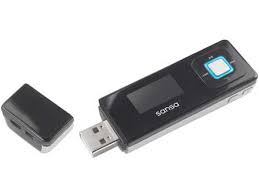
In case this happens again, here's how to un-brick a Sansa Express... in Windows XP, with access to the Administrative Tools (I'm not sure how to do the same in Linux - any ideas?).
I'm unsure how my son's Sansa Express was bricked, but a common cause fro "bricking" is the inability of the Sansa Updater to finish the complete process of updating the firmware. A complicating factor can be the lack of a newer version of the firmware... so you need to have a older version of the firmware on hand [thankfully chrisjs has a copy].
Okay, here's what to do:
- Unzip the files from the 7zip file, (see link above), into it's own directory.
- Hold the Volume Down - button on the Sansa Express while inserting it into a USB port on your computer, and hold for about 20 seconds.
- Release it, and hopefully in Windows Explorer you should see 2 Flash Drive symbols, but when you try to use them, they're empty, and you can't format them either (they're 0Mb in size :])
- DON'T PANIC!
- In my case, access to the Admin Tools is off the Control Panel - the one that I've used is Computer Management.
- Under Storage, click on Disk Management
- In the top right panel, locate your dud "Flash Drive"... it shouldn't indicate a file system, because that's what a bricked Sansa looks like...
- Right-mouse click on the Disk Drive icon in the left column of that same panel, and you should see the option to format your Sansa - (at this point I can't remember is I used FAT as the filesystem, or FAT32).
- Format the Sansa
- Then go back to the directory with the unzipped files, and use SansaExpressUpdater.exe
- You should find that the Sansa Updater will complete the update, and when the process is complete, the Sansa Express should be un-bricked.
Subscribe to:
Posts (Atom)